How to schedule a meeting across time zones when daylight saving changes
For a one-off meeting, use a named location-based zone and the meeting’s actual date. A fixed UTC offset can be right today and wrong on the date you are trying to schedule.
Choose a named zone, then choose the date
A name such as America/New_York carries time-zone rules,
while a fixed offset such as UTC−05:00 does not. The
IANA time-zone theory
explains why zones are identified by geography and why their rules can
change. The IANA
tz-link page
links the database and its use.
In the working-hours meeting planner, select the source participant, enter that person’s local date and time, and select named zones for everyone else. Set a duration from 15 to 120 minutes, select working weekdays, and enter each person's local working window. The result requires the full duration to fit every selected window. Then check the displayed local start and end time, UTC offset, and working-hours overlap. The planner is for comparing one instant; it does not read calendars, detect holidays, make bookings, or maintain recurring meetings.
Duration, workdays, and overnight shifts
A 60-minute call beginning at 16:30 does not fit a 09:00–17:00 window: its final half hour is outside work hours. The planner checks every minute in the meeting, with the end instant excluded. Search the selected source date or the next seven source dates when weekdays do not line up.
For an overnight shift such as 22:00–06:00, the 00:00–06:00 portion belongs to the weekday when that shift began. A Friday overnight shift therefore includes early Saturday until 06:00 even if Saturday is not selected as a workday. The selected time can still be shared, copied, or downloaded as a local calendar event when it is outside work hours; the planner marks that as an intentional exception.
Two daylight-saving edge cases
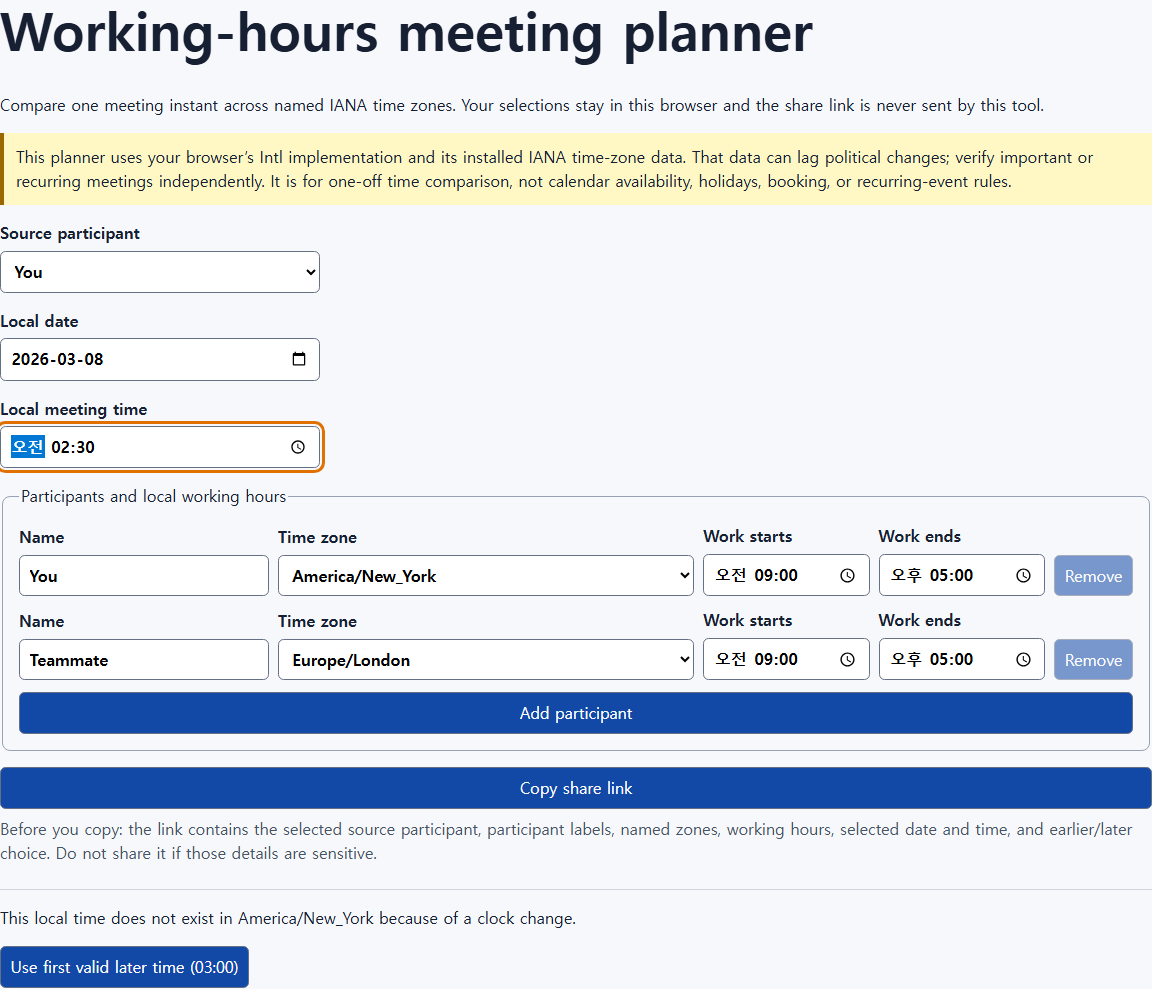
On March 8, 2026 at 02:30,
America/New_York has a spring-forward gap: that local
wall time does not exist. The tool calls this out and offers the first
valid later local time rather than silently choosing one.
On November 1, 2026 at 01:30, New York has a fall-back fold: 01:30 occurs twice. The planner shows an Earlier and a Later choice, each with its offset and ISO instant. Pick the occurrence that matches the invitation or the other participant’s stated time; “01:30” by itself is ambiguous on that date.
Why browser results can need a second check
This site uses the browser’s ECMA-402 Internationalization API and the IANA time-zone data available to that implementation. Time-zone rules sometimes change by government action, and a browser can lag an IANA release. Check the IANA release page for updates when a political change is relevant, and confirm important or recurring events in the calendar system and with participants.
Share carefully
The planner keeps selections in the browser, but a copied share link contains the selected source participant, participant labels, zones, working hours, chosen date/time, and earlier/later choice. Review those details before sending the link. For an important meeting, include the named zone, local time, date, and UTC offset in the invitation so recipients can spot a mismatch.